AI and Health: How to Get Advice Safely

I use AI for my health regularly: I give it my blood results and my sleep and training records, and I ask about the connections. The word “safely” in the title has two meanings. First, advice I can trust: numbers from my own data, verifiable, no hallucinations. Second, privacy: I know where my data ends up and who sees it. One sentence ties them together: the more data you give AI, the better the answers, but the more you risk. This article covers both: first trustworthy advice, then privacy. All numbers in the examples are made up.
AI can invent a number and sound sure
Imagine this answer: “Your blood wellbeing level is 87.3 mmol/L.” It sounds precise, it even has a unit. But a “blood wellbeing level” doesn’t exist. The number and the unit are both invented.
Chatbots like ChatGPT, Gemini, Claude or Grok are built on large language models (LLMs). Such a model learns to predict the next word in a text. When it lacks data, it fills in something that only looks plausible. OpenAI calls this hallucination and itself explains that training and evaluating models often rewards guessing more than admitting “I don’t know” (OpenAI 2025). So it isn’t a random bug, it’s a property of how the models work.
Two examples from healthcare:
- When ChatGPT (version 3.5) wrote short medical texts, 47% of its 115 cited references were completely made up and 46% were real but contained wrong details. Only 7% were correct (Bhattacharyya 2023). Newer models are better, but they still make mistakes.
- In a randomised study from Oxford, 1,298 people worked through ten medical scenarios. On their own, the models identified the condition correctly in 94.9% of cases. The people who talked to them did so in fewer than 34.5% of cases, no better than a control group that searched however they liked (Bean 2026). People often didn’t know what information the model needed, and the answers mixed good and bad advice (University of Oxford).
That’s why, in the age of AI, critical thinking and general knowledge matter more than before. You have to recognise when the model is making things up.
AI is a voice, not a source
I don’t ask AI questions “off the top of its head”. I ask it about my data.
AI may:
- read my results and compare them over time,
- explain in plain language what they mean,
- turn a long study in a foreign language into something easy to understand.
AI may not:
- take numbers from memory. After a long conversation, it can easily turn my 6.9 into 9.2. Research shows that models handle information in the middle of a long text worse, even when it’s right there (Liu 2024).
- fill in what’s missing. If something isn’t in the data, it should say so.
Numbers belong in the data, not in the model’s “head”.
More data, better answers
One result is one point. Between points, AI just guesses. Here’s cholesterol as an example (the numbers are illustrative):
- I see a doctor: “My total cholesterol is 6.9.” A single number above the recommended value leads to a discussion about how to lower it.
- I go differently: “I’m at 6.9. Last year 7.9, before that 8.9, and three years ago 10. I changed my lifestyle.” Suddenly it’s clear that what I’m doing works, and the conversation is completely different.
Same number, different conclusion. The more sources, the more connections. That’s more than a person can easily keep track of, and this is where AI helps prepare the groundwork. The doctor decides, though.
Triangulation: genome, blood, sleep
I split my data into three layers. Each answers a different question:
- The genome is the foundation. It shows predispositions, what I’m prone to, for better and worse. It practically doesn’t change over a lifetime.
- Blood is a snapshot in time. Body composition belongs here too. It gives me a goal for the next test, in six months or a year.
- Sleep is today. Rings, watches and bands measure recovery and readiness.
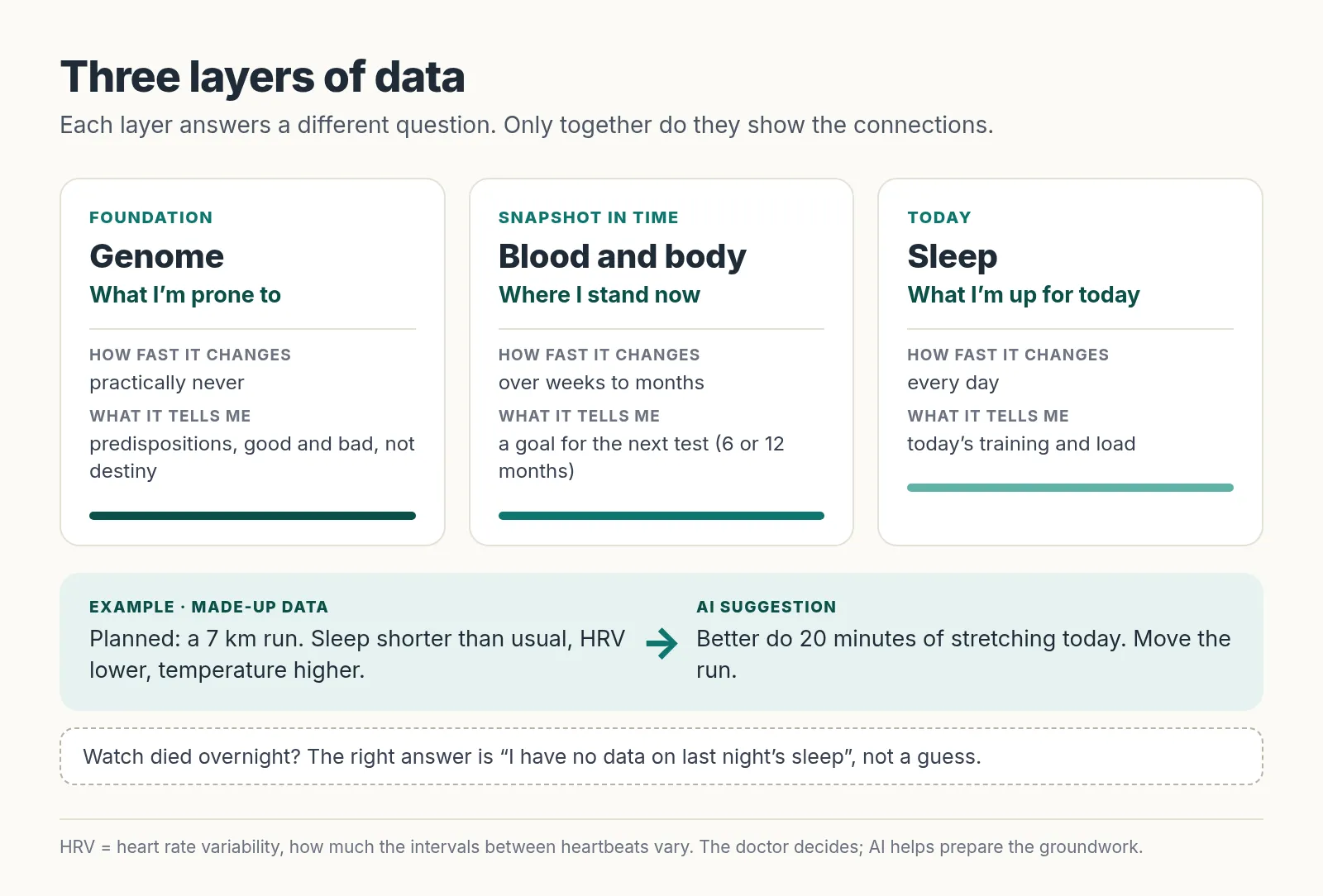
Example: I have a 7 km run planned for today. But my watch shows shorter sleep, a higher temperature and lower HRV (heart rate variability, meaning how much the intervals between heartbeats vary, Shaffer and Ginsberg 2017). The sensible advice: do 20 minutes of stretching instead. It works the other way too. I feel lazy, but the numbers are good, so I go and train.
Don’t treat data from wearables like a lab, though. Compared with a sleep lab (polysomnography), most of the tested devices detected sleep well, waking at night less well, and sleep stages unreliably. With disrupted sleep, accuracy was worse (Chinoy 2021). Good enough for trends; I wouldn’t bet on a single night.
I don’t have a team of experts at home evaluating my genome, blood, sleep and training together every day. AI is a voice over that data.
Coaching, not diagnosis
I give the model three rules:
- Numbers only from the data, never from the chat’s memory.
- A blank instead of a guess. If my watch died overnight, the right answer is “I have no data on last night’s sleep”, not “you slept great”.
- Coaching, not diagnosis. Diagnosis and treatment belong with a doctor.
The sentence “don’t make things up” in the prompt isn’t enough on its own. That’s why I always check the numbers in the answer against the source.
Not being ill isn’t the same as being healthy
Every blood marker comes with a reference range on your results. But that isn’t the line between health and illness. A lab usually calculates it so that 95% of healthy people from a reference group fall inside it. So the other 5% of healthy people are “out of range” (Ozarda 2016).
A made-up example: the range is 10 to 100. With a value of 11, I hear “everything’s fine”; with 9, “you have a problem”. Yet 11 and 9 are close. Now imagine the optimum were, say, 60 to 70. There’s a huge difference between 11 and 60, and yet both pass as “in range”. For some markers, there are also target values from large studies that differ from the reference range. Cholesterol is the typical case (Ozarda 2016). This is where AI helps me find where to move if I want to be healthy, not just not ill.
Be careful with “optimal ranges” from the internet, though. Many of them have no support in studies. When AI suggests an optimum, I want a source for it. And when a value is outside the reference range, a red light comes on and I see a doctor.
How I do it: from chat to my own system
My path had five steps:
- Chat. I started like most people: I poured everything into a chat. It worked, but in a long conversation the model forgot things and made things up. I constantly had to keep watch and start new threads.
- Gemini and a notebook. Then I switched to a notebook over my own PDFs (NotebookLM back then, Gemini Notebook today), connected to Gemini. That was a big leap: the answers were based on my data and could be checked.
- My own system with a cloud model. I started vibecoding my own system, meaning building software by describing to AI what it should do while the AI writes the code. I called the model through an API, a programming interface that lets an app send requests straight to the provider’s model. Compared with the chat, this was better for privacy: by default, the big providers don’t use data from their paid APIs for training and keep it only for a limited time to check for abuse, up to 30 days at OpenAI and Anthropic, 55 days at Gemini (OpenAI, Google, Anthropic). But the data still left my computer.
- My own system with a local model. I wanted to use local models over my data and have absolute control, not only over how the data is processed, but also over what the whole system can do. The model now runs on my machine and I don’t send the data anywhere.
- A product. My home system grew into a commercial product. To be upfront: this is my company. A friend and I are developing Methos BiOS, and I’ll write about it in detail in a separate article.
A custom system isn’t for everyone, though. For most people, a notebook is a sensible middle ground, and that’s what I’ll describe here.
A notebook over your own sources
A notebook is a tool that answers only from the files you upload and cites them. One example is Gemini Notebook, called NotebookLM until July 2026 (Google). It can also be connected to the Gemini app. There, the chats follow your Keep Activity setting, including review by humans (Gemini Apps Privacy Hub).
Step 0 (once is enough): remove personal details. AI doesn’t need your name, national ID number or address; your age is enough. Watch out for one trap: a black box drawn in a PDF viewer usually doesn’t remove the text, it only covers it. The text stays underneath and can be copied, and text is exactly what AI reads. Use a redaction feature that actually deletes the text, then try to select and copy the text in that spot (Macworld).
Then: new notebook → add sources → upload the edited PDFs.
The notebook works like a data vault. It answers only from the uploaded sources and shows citations with its answers. Clicking a citation opens the exact spot in the source (Gemini Notebook Help). So it hallucinates much less, and above all you can check it. It isn’t zero risk, though.
According to Google, the uploaded data isn’t used for training unless you give feedback on an answer (👍/👎). If you do, Google may review the whole interaction, including the uploaded files. On the free plan you can have 50 sources in one notebook, on the paid Pro plan 300 (Gemini Notebook Help). That’s plenty for health results. By the way, it works just as well for studying.
You don’t have to paste the prompt below into every chat. The simplest option is to save it as the notebook’s custom instructions: in the chat, click Configure Chat → Custom. They then apply in both Gemini Notebook and Gemini (Gemini Notebook Help). In Gemini, you can also turn the prompt into an assistant. This used to be called a Gem; for personal accounts, Gems were replaced by skills on 17 November 2026 (Gemini Apps Help). How: Customize → Skills → create, paste the prompt into the instructions and attach the notebook via Add → Notebooks. You can then call the skill by name in any chat. It’s only for people aged 18 and over (Gemini Apps Help). In Gemini, though, answers can draw on the web as well as your sources (Gemini Notebook Help), which is why the very first line of the prompt is “answer only from my sources”.
Show AI prompt
Answer only from my sources in this notebook. If it isn't in them, write "this isn't in my data" and don't fill anything in.
For every number, state which source and which date it comes from.
Never take numbers from memory or from the previous conversation; always find them again in the sources.
If data is missing (for example, last night's sleep record), say so and don't guess.
You are a coach, not a doctor. Don't give a diagnosis or treatment. If a value is outside the lab's reference range, write that it's a matter for a doctor.
At the end, list what I should verify and what to ask a doctor.
At least click that citation. The link may not work, or it may lead somewhere else entirely. With a regular chat, it can easily happen that after you check, it apologises: “You’re right, this is a study about bedwetting in young children and you asked about cholesterol.”
What can happen to what you upload
It has already happened
- Shared chats in search results. In 2025, Google indexed around 4,500 shared ChatGPT chats. These were chats where people, when sharing, ticked a box allowing search engines to find them. OpenAI then removed that option (Fast Company, Fast Company). For Grok, more than 370,000 conversations showed up in search because the share button created public pages without warning (Forbes). Among them were health questions. Anyone with a shared link can open it. If you want to show something to a friend, copy the text and send it in a message or email.
- A bug in the code. In March 2023, some ChatGPT users saw the titles of other people’s conversations, and for a small share of subscribers partial payment details may have been visible. The cause was a bug in an open-source library, not a hacker (OpenAI).
- Stolen logins. The company Group-IB found ChatGPT login details from 101,134 devices on the black market. Nobody guessed them. They were stolen by malware on infected computers that harvests passwords saved in the browser (Group-IB). A stolen account means access to all your chats.
It could happen
- Your data changes hands. 23andMe, the genetic testing company, went bankrupt in 2025. Its services, together with customer data, were bought by the non-profit TTAM Research Institute for 305 million dollars (23andMe, SEC). Hardly anyone reads the terms of service. At least have AI summarise them and ask what happens to the data if the company is sold.
- Prompt injection. Text can be hidden in a document or web page, for example white text on a white background, that “orders” the AI to do something, such as leak data. A person doesn’t see it; the model reads it (OWASP). Don’t upload files from unknown sources together with sensitive data.
- Misuse by an insurer or employer. In the EU, health data and genetic data get special protection (GDPR, Art. 9), and discrimination based on genetic make-up is also prohibited by the Council of Europe’s Convention on Human Rights and Biomedicine (Oviedo Convention, Art. 11). But the law won’t help once the data has leaked.
It’s not just your data
A doctor’s report for your parents, a friend’s prescription, your genome. A genome reveals something about your relatives too. At 23andMe in 2023, attackers got into about 14,000 accounts using passwords leaked elsewhere, and then, through the relative-finding features, reached the data of about 6.9 million people (23andMe). According to a study in Science, a database of 1.3 million people would be enough for about 60% of Americans of European descent to have a relative in it at the level of a third cousin or closer (Erlich 2018).
A doctor’s report your mum gave you isn’t consent to process her data. And even without a name, a detail can give away who it’s about: “Joe Bloggs from our street has low testosterone.”
Where to put sensitive data
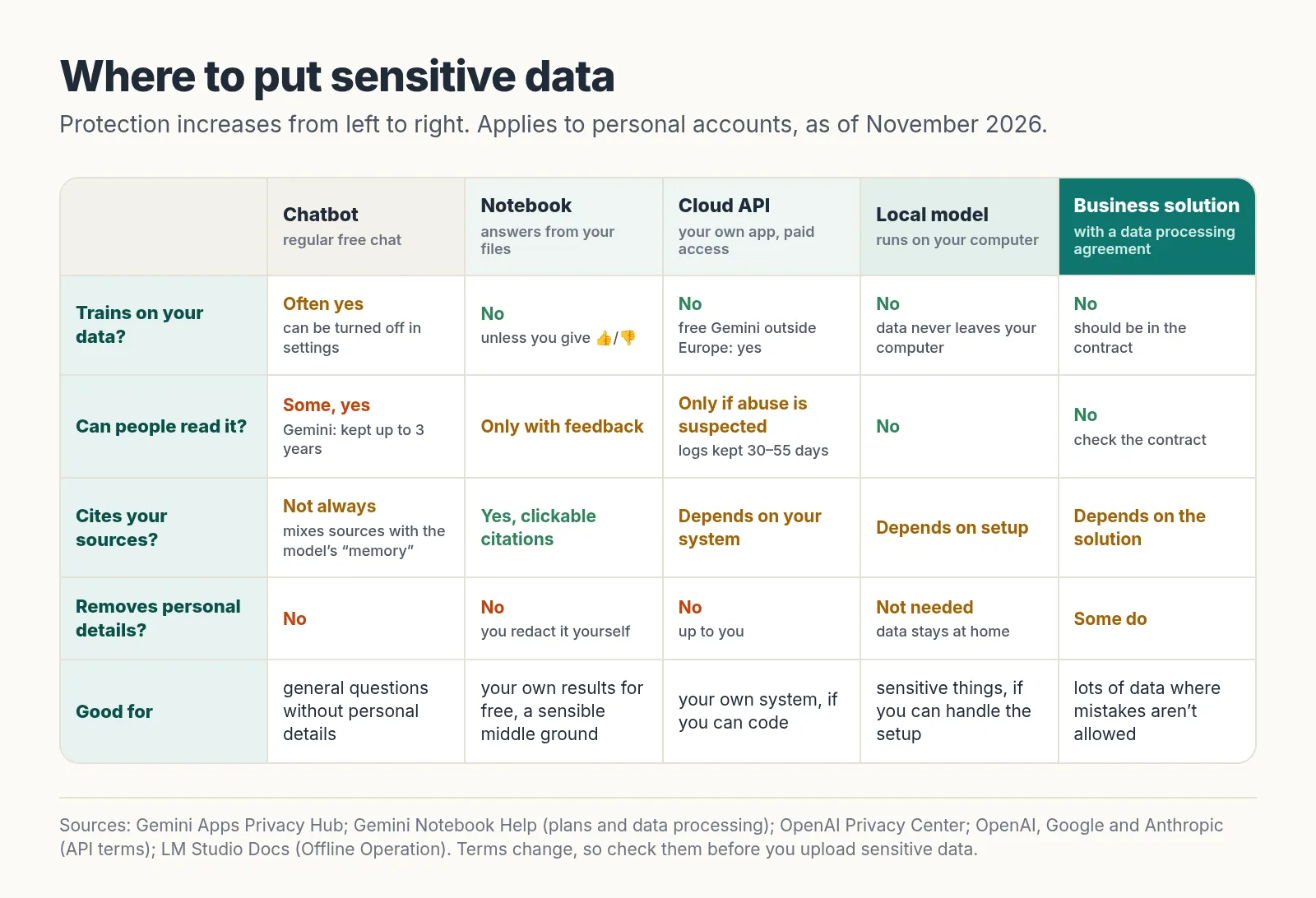
- General questions (“what is HRV”) are fine in a regular chat, but without personal details. With Gemini, people read some chats, and those chats are kept for up to 3 years even if you delete them (Gemini Apps Privacy Hub).
- Your own results, for free: a notebook over your own sources. The golden mean.
- Your own app via an API: if you can code (or vibecode), the paid APIs of the big providers don’t train on your data by default. Watch out for the free tier of the Gemini API: outside Europe, Google uses data from it to improve its models and people may read it. In the EU, Switzerland and the UK, the same rules apply to it as to the paid tier (Google). But the data still leaves your computer, and protect your API key like a password: it doesn’t belong in your code or in shared files, and set a spending limit (OpenAI).
- Sensitive things fully at home: a local model on your computer, for example via LM Studio or Ollama. Once the model is downloaded, it runs without the internet and what you put in never leaves your computer (LM Studio). It does need a more powerful computer and a bit of setup.
- Lots of data and no mistakes: a professional solution with a data processing agreement (DPA, a contract in which the provider commits to what it may and may not do with the data). OpenAI doesn’t train on data from its Business and Enterprise plans by default (OpenAI). With such a solution, check that it doesn’t train on the data, that people don’t read it, that it can remove personal details and that it keeps an audit log, a record of every access to the data.
This is also where my own path led, to Methos BiOS, which I’m developing with a friend. It’s my company, so I’m not reviewing it here.
How to reduce the risk
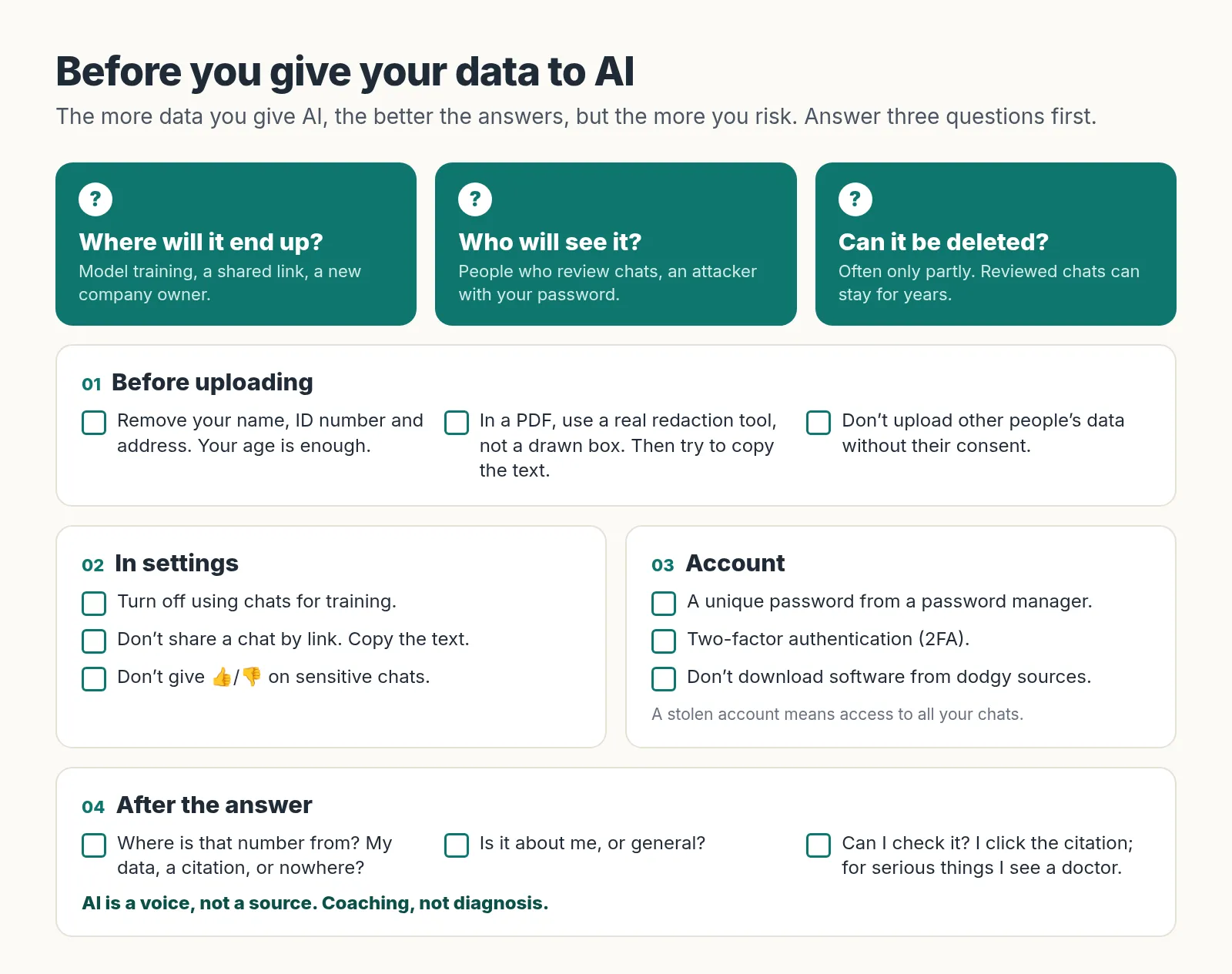
1. Before uploading. Remove your name, national ID number and address with real redaction. Put sensitive things only into a notebook, into your own system via a paid API, or ideally into a local model.
2. In settings. In the privacy or data settings, turn off using your chats to train the model. Don’t share chats by link; copy the text. Don’t give 👍/👎 on sensitive chats; services may use feedback even when training is turned off. Option names change and every service puts them somewhere else. If you can’t find the setting, ask that AI directly where to turn it off.
3. Account. A strong, unique password, ideally from a password manager, and two-factor authentication (2FA): after entering your password, you also confirm the login with a code or on your phone. The 23andMe attack relied on exactly the passwords people were reusing elsewhere (23andMe). And don’t download software from dodgy sources; the stolen ChatGPT logins came from infected computers (Group-IB). “Joe123” is not a password.
Three questions for every piece of AI advice
- Where is that number from? From my data, from a citation, or from nowhere?
- Is it about me, or general? I don’t care that 99 people out of 100 are fine. I want an answer based on my data, and if there isn’t any, the AI should say so.
- Can I check it? I click the citation. For serious things, I see a doctor.
If the advice fails even one of these questions, I read it like a horoscope.
Sources
- OpenAI (2025): Why language models hallucinate
- Bhattacharyya M et al. (2023): High Rates of Fabricated and Inaccurate References in ChatGPT-Generated Medical Content. Cureus.
- Bean AM et al. (2026): Reliability of LLMs as medical assistants for the general public: a randomized preregistered study. Nature Medicine.
- University of Oxford (2026): New study warns of risks in AI chatbots giving medical advice
- Liu NF et al. (2024): Lost in the Middle: How Language Models Use Long Contexts. TACL.
- Shaffer F, Ginsberg JP (2017): An Overview of Heart Rate Variability Metrics and Norms. Front Public Health.
- Chinoy ED et al. (2021): Performance of seven consumer sleep-tracking devices compared with polysomnography. Sleep.
- Ozarda Y (2016): Reference intervals: current status, recent developments and future considerations. Biochem Med.
- Google (2026): NotebookLM is now Gemini Notebook
- Gemini Notebook Help: Use chat in Gemini Notebook
- Gemini Notebook Help: Learn about Gemini Notebook’s plans
- Google: Gemini Apps Privacy Hub
- Macworld (2024): How to easily redact text in a PDF on your Mac
- Fast Company (2025): Google is indexing ChatGPT conversations and OpenAI pulls ChatGPT feature that showed personal chats on Google
- Forbes (2025): xAI published hundreds of thousands of Grok chatbot conversations
- OpenAI (2023): March 20 ChatGPT outage: Here’s what happened
- Group-IB (2023): 100K+ compromised ChatGPT accounts on dark web marketplaces
- 23andMe (2023): Addressing Data Security Concerns
- TTAM Research Institute (2025): Completes the acquisition of 23andMe assets and SEC Form 8-K
- OWASP (2025): LLM01:2025 Prompt Injection
- Regulation (EU) 2016/679, GDPR, Art. 9
- Council of Europe: Convention on Human Rights and Biomedicine, Art. 11
- Erlich Y et al. (2018): Identity inference of genomic data using long-range familial searches. Science.
- LM Studio Docs: Offline Operation
- OpenAI Help Center: Privacy Center in ChatGPT
- OpenAI: Data controls in the OpenAI platform
- Google: Gemini API Additional Terms of Service and Abuse monitoring
- Anthropic Privacy Center: How long do you store my organization’s data?
- OpenAI Help Center: Best practices for API key safety
- Gemini Notebook Help: Notebooks in Gemini Apps
- Gemini Apps Help: About the transition from Gems to skills
- Gemini Apps Help: Create & manage skills for Gemini Apps